
SeismoFit Fitness

Background:
Cardio Respiratory Fitness (CRF) reflects metabolism and, as the name indicates, the lungs and heart interact by the supply of oxygen to tissues and organs and by the elimination of carbon dioxide. A person’s maximum oxygen capacity means the maximum oxygen consumption determined until exhaustion and is called VO2 max.
While sports enthusiasts and athletes are often very interested in knowing their VO2 max level, CRF is also a valuable metric for assessing overall health. CRF is usually measured using an ergometer-bike or running test that pushes the client to exhaustion while breathing through a mask for analysis of the exhaled gases.
The VentriJect Seismofit® system eliminates this effort, but the precision is thus slightly less – expressed by the fact that the spread of the values (compared to the theoretical algorithms) is slightly larger (about 9%) than for an ergometer test (5%). However, this is accurate enough for a general health professional assessment.
In recent years, the scientific importance of measuring, estimating and monitoring cardio-respiratory fitness has been increasing.”
Fitness is a clinical sign of vitality” (American Heart Association (AHA), 2016), “Low levels of cardio-respiratory fitness (CRF) are associated with a high risk of cardiovascular disease, and CRF is likely a stronger predictor of mortality than established risk factors such as smoking, hypertension, high cholesterol, and type 2 diabetes mellitus.
Procedure and equipment:
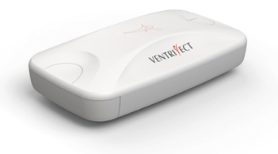
Seismophyte® measures vibrations (tremors) that arise from a heartbeat and are transmitted to the chest. Each heart has its own signature in relation to opening and closing valves and relaxation and contraction of the heart chambers. And because only vertical tremors are measured, it is important that the person lies down.
Determination of VO2 max takes 3-4 minutes and is without physical exertion.
Note: Do not test clients with electronic implants such as Pacemakers and the like.
Check in advance that the iPhone is fully charged (and otherwise it can be connected to a USB stick in the PC if the PC is also set to charge).
Clinic procedure:
- Turn on the iPhone (code 258011) and make sure you have access to the Internet via our small Huawei WIFI router. The router’s Password is in the router’s main menu.
Note: Any codeless guest WIFI may be used for the fitness test, as personal identification is not part of the data sent.
- Open the VentriJect App and see that the phone can see the sensor.
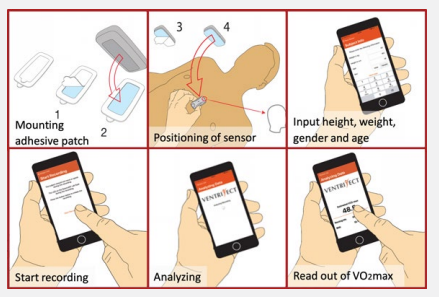
- The sensor is glued to a special double-sided Mepor label, which is then glued to the chest (lower part of the sternum). The head figure on the sensor should face the client’s face. The sensor cannot be glued to the outside of the garment. If there is too much hair on the chest, click off as much as possible and try again (It should not be necessary to shave).
- Load the client’s height, weight, age, and gender.
- Press start.
- Testing takes about 45 seconds. However, since the Seismofit analyzes the following minutes, the client can appropriately remain until the registration is complete.
- The iPhone now sends data to a Cloud Server, which after a few minutes sends the VO2 max value back.
- The value is noted in AGS’ ACCES database.
- NOTE: If the test was performed AT A DIFFERENT TIME than what is stated in the client’s “place” in the timetable, please note the time of the test in the timetable. We need this in case the test is later to be found at the supplier.
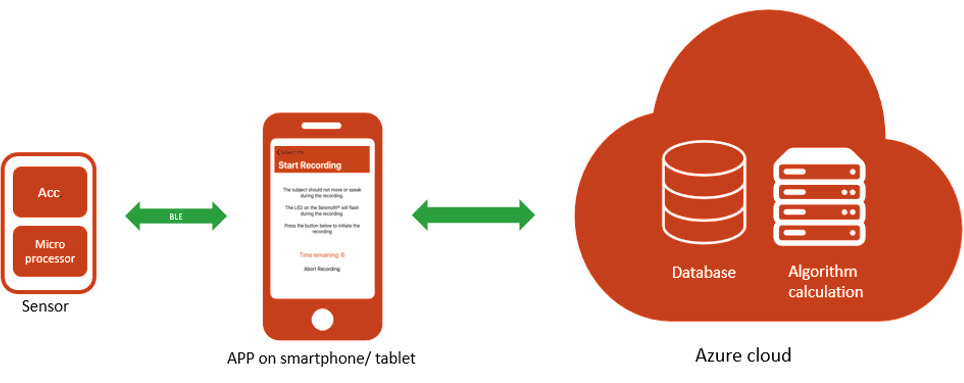
The value can be found in the cloud-based database (for a limited time), but since no personal identification is registered, you can only find a given test by specifying the date/time.
What can go wrong?
- No mobile broadband (WIFI) = no connection to the Cloud function. Check if there is a guest WIFI on site (If it is NOT password protected, it may ONLY be used on iPhone for fitness tests. NOT for the clinic PC).
- Too much clothing. Textile dampens vibrations and the sensor measures much too low. Can/must not be on the skin, we cannot vouch for the test.
- Too much hair on the chest (Do we need a razor in the kit?). Cut off as much hair as possible and try again.
- Other “abnormalities” such as surgical scars or wounds: Try to place the sensor slightly to the side so that contact is achieved with “normal” skin.
- Too cold on the floor – or not enough space. It’s OK to fold your legs. Bare the upper body lies flat.
If VO2-Max is out of scale:
- Check that Gender is correct and that there has been no swap of Height and Weight under data input?
- Check that correct units have been used (Metric vs Imperial).
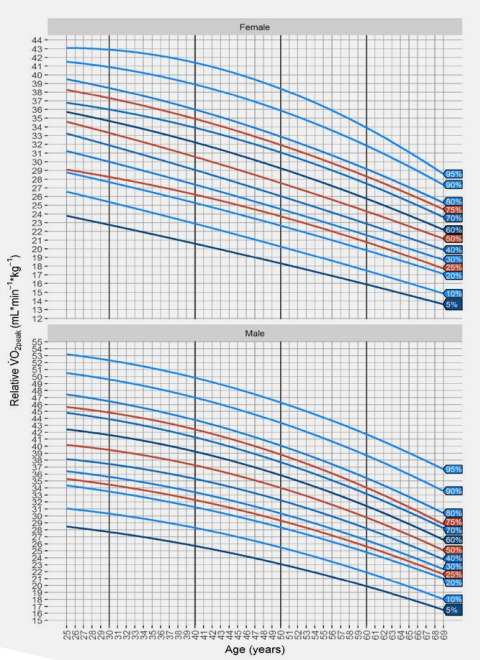
VO2 max value changes with age and also depends on Gender – as indicated on the graphs above.
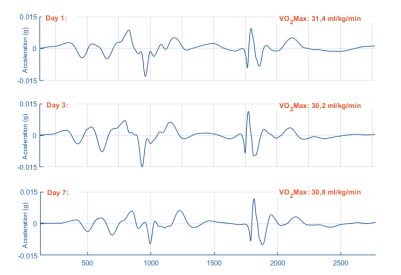
An example of a client goal on 3 different days.
Quick Guide:
- Check that the iPhone is fully charged,
- Turn on iPhone (code 258011),
- Check that the iPhone is connected to Wifi,
(Note: Any codeless guest WIFI may be used) - Insert battery into the sensor. Battery top = Sensor Logo front (numbers are on the back),
- Open the VentriJect App and see that the phone can see the sensor,
- The sensor is glued to a Mepor label, which is glued to the chest (lower part of the sternum),
- Load the client’s height, weight, age, and gender,
- Press start,
- The client’s heart rate is measured for 45 seconds. Then a bib and the client is done,
- iPhone now sends data to a Cloud Server, which quickly sends the VO2 max value back,
- The value is noted in AGS’ ACCES database.
Error messages (we see very rarely) and what they mean:
Sometimes we do something wrong, our clients do something wrong, or Seismofit® is just picky!
Here’s what each error message tells you to fix for the remeasurement to be successful:
- VO₂max Out of Bounds – The result seems unusually high or low.
- This error occurs most often when height and weight data are swapped.
- Double-check that height, weight, and gender are entered correctly.
- Make sure you’re using the correct unit type (metric vs. imperial).
- Data Connection Error – Your measurement is ready, but does not arrive at VentriJect’s servers
- Try switching between WiFi and mobile data for a better connection.
- Try if you can get access to a guest Wifi.
- Heart Rate Out of Bounds – Heart rate seems too high or low for a resting measurement
- Give your client 5 more minutes to really relax (if possible during the examination time),
- Let the client “spread the word” that it is best not to have been active, eaten or climbed stairs recently.
- No Heartbeat Signal Detected – The sensor has trouble picking up a clear signal
- Double-check that the patch is firmly attached to clean, dry skin.
- Press lightly on the edges of the patch to ensure they are firmly attached.
- Remind your patient to stay still.
- Signal Too Noisy – There is too much interference or movement
- Make sure your client is completely still,
- Move all clothing away from the sensor,
- Put phones and other electronics aside for a moment.
When patients question their results compared to their Smartwatch:
Both methods of measurement are scientifically sound but sometimes show different values due to their different methods. The most important thing is the trend. If both values increase over time, fitness improves.
If we had enough time, we could –
• Offer a repeat measurement with longer/better rest
• Verify the accuracy of input data (height, weight, gender)
• Compare with their actual fitness activities and capabilities
• Discuss natural biological variation in all physiological measurements
Understanding these variations helps to provide better guidance to our clients and builds confidence in the measurement process. Remember that consistency in methodology and tracking trends over time provides the most valuable insight into changes in cardiovascular fitness.